

Find
Search and replace
Finding notes by words, filters, text inside PDFs and images, saved searches, and replacing across notes.
Searching
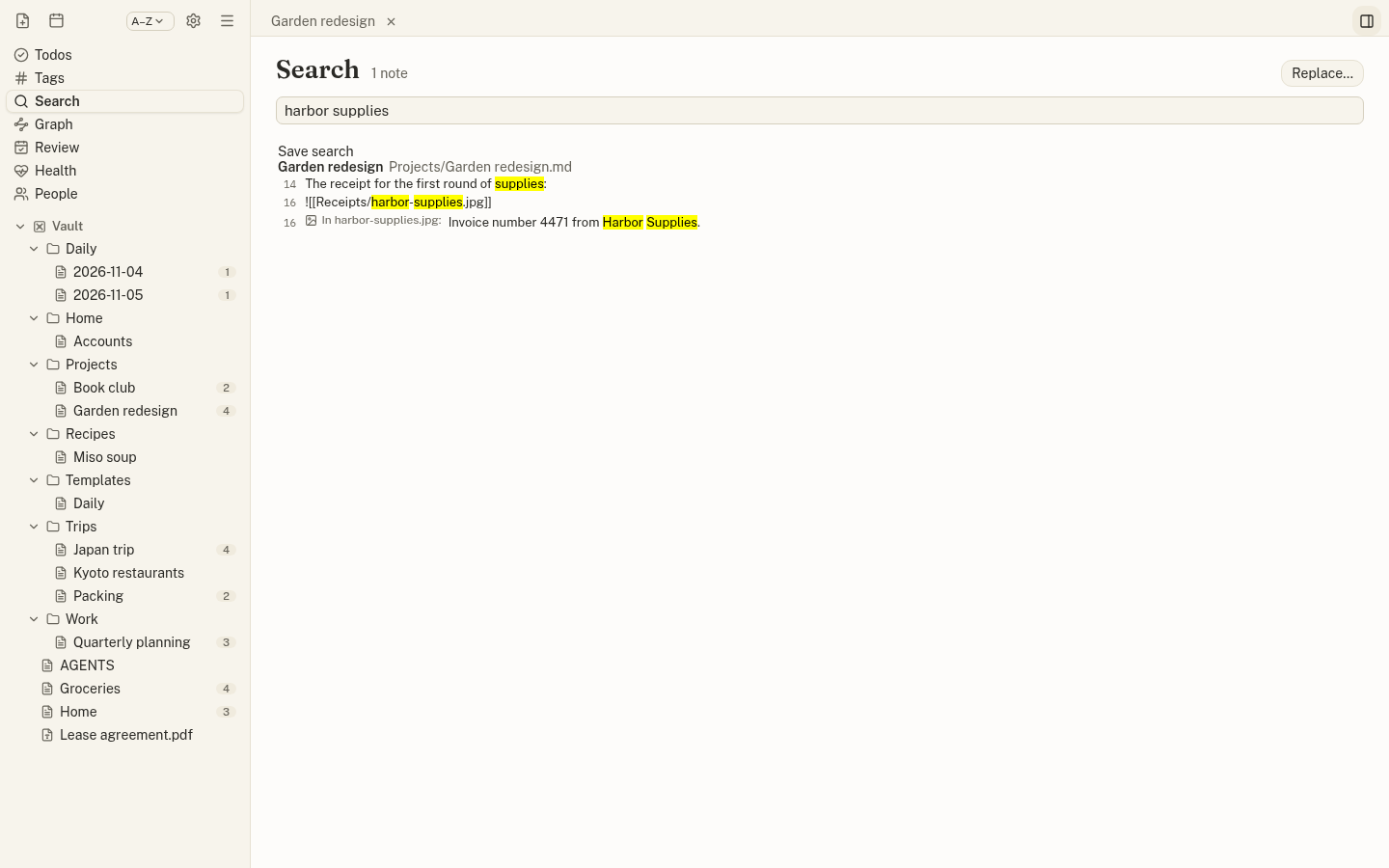
Open Search (Ctrl+Shift+F). Every word must appear; "exact phrase" matches words together, and -word leaves out notes that contain it. Notes with the words in their title come first.
tag:workor#workis:todo(open todos) oris:donedue:overdue,due:today,due:week,due:nonein:vaultorin:<folder or project>
Text in PDFs and images
Search includes the text inside PDFs (a hit opens at its page) and inside the PNG and JPEG images your notes show: a photo of a receipt, a screenshot, a scanned page. A hit from an image says In photo.jpg: and opens the note at the image.
Scanned PDFs and images are read with on-device text recognition (English). Nothing leaves your computer; the text is cached outside your folders, so only new or changed files are read again. Images over 25 MB and other image formats are not read.
Saved searches
Click Save search to keep a search by name. It appears in the sidebar with how many notes it finds, and in the command palette.
Replace across notes
Replace… in the Search view previews every change, note by note, before anything is written. Match case or whole words, use a regular expression ($1 in the replacement), and work in one folder or all of them. Uncheck notes to leave them out.